Dialog manager
Manage a dialog that opens in the application. You can switch a page from alignment, position, size, findDialog, and openDialog.
Although dialog that was opened via AppInstance.openDiaglog, cpr.controls.Dialog.open is managed by the manager, it is difficult to manage the dialog since dialogName is randomly created.
Functions of the dialog manager
- Alignment
- Inquiry
- Change position and size
- Switching a page via openDialog
openDialog
You need the following parameters to open dialog from the dialog manager.
| Required parameter | Description |
|---|---|
| appId | Receive the application's ID in String or receive applicaton object. ex) Receive "test", if the applcation's ID is test.clx. A loaded app object will be received for the application object. |
| dialogName | Set a name to inquire a dialog. If the open dialogName is identical, switch dialog phase to appID. |
| dialogConstraint? |
Receive the values for left, top, right, bottom, height, width in object. Standardize the position as vertical center, if height is set but top and bottom is not set. Standardize the position as horizontal center, if the width is set but left and right is not set. |
| handler? | You can reset before the dialog is loaded and be drawn. |
Alignment
You can align the open dialogs inside the application's container.
| Required parameter | Description |
|---|---|
| type | Set the alignment method. tile, cascade |
| prop? | Set the interval between the aligned dialogs. horizontalMargin, verticalMargin, horizontalSpacing, verticalSpacing |
Example
tile alignment method
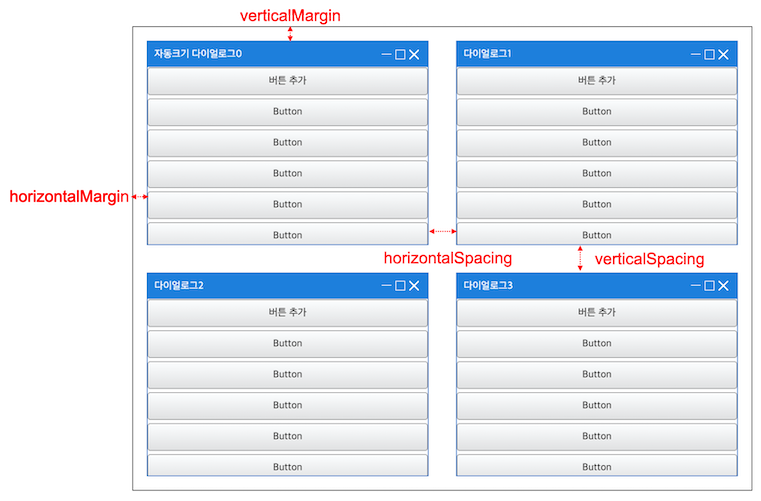
app.dialogManager.sort("tile", {
		horizontalMargin: 20, // blank space(left and right) at the space used to display dialog
		verticalMargin: 20, // blank space(top and bottom) at the space used to display dialog
		horizontalSpacing: 40, // blank space(left and right) in between the dialogs
		verticalSpacing: 40 // blank space(top and bottom) in between the dialogs
	});
cascade alignment method

app.dialogManager.sort("cascade", {
		horizontalMargin: 20,
		verticalMargin: 20,
		horizontalSpacing: 40,
		verticalSpacing: 40
	});
Search
You can search the name through dialog's object that has the dialog's name.
| Name of the API | Parameter | Description |
|---|---|---|
| getDialogName | Dialog | Return the name via dialog. |
| getActiveDialogName | null | Return the name that is placed at the very first of the currently-activated dialog. |
| getDialogByName | string | Return name through dialog. |
| getDialogNames | null | Return names of the dialog. |
Changing position and size
You can renew the position information of the dialog.
| Name of the API | Parameter | Description |
|---|---|---|
| updateConstraintByName | string, Object | Change or add the current constraint property. |
| replaceConstraintByName | string, Object | Change the current constraint property with a new information. |
Example
- updateConstraingByName
// Current constraint {top:20, left:20, height:300, width: 300} app.dialogManager.updateContraintByName("test",{ top: 100,left:100}); // Changed constraint {top: 100, left:100, height:300, width: 300} - replaceConstraintByName
// Current constraint {top:20, left:20, height:300, width: 300}
app.dialogManager.replaceConstraintByName("test",{ height: 300, width: 300});
// Changed constraint {height:300, width: 300}
Switching openDialog page
You can change the page if you re-open with openDialog.
Example
Switching dialog page
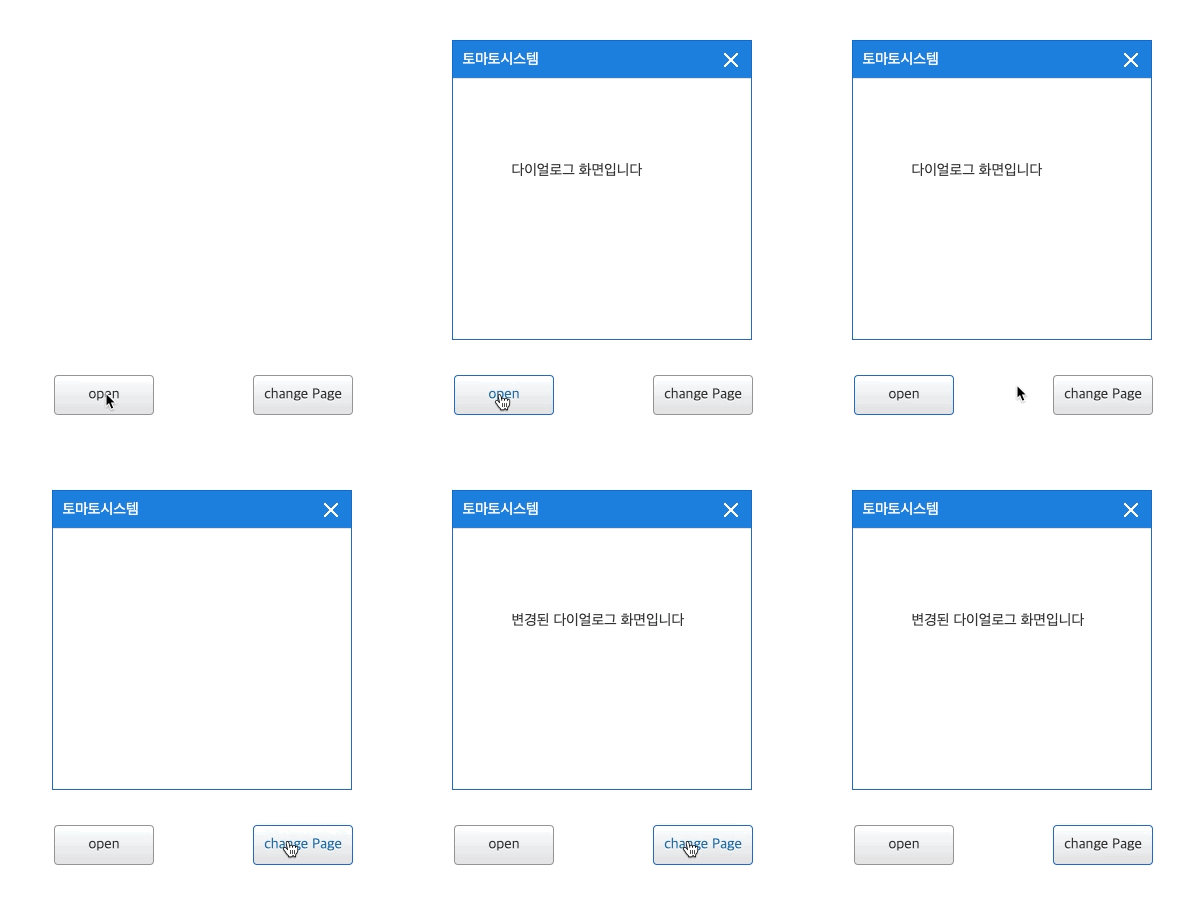
// If the current dialog name is "tomato"
app.dialogManager.openDialog("exbuilderPopup","tomato",{height:300,width:300});