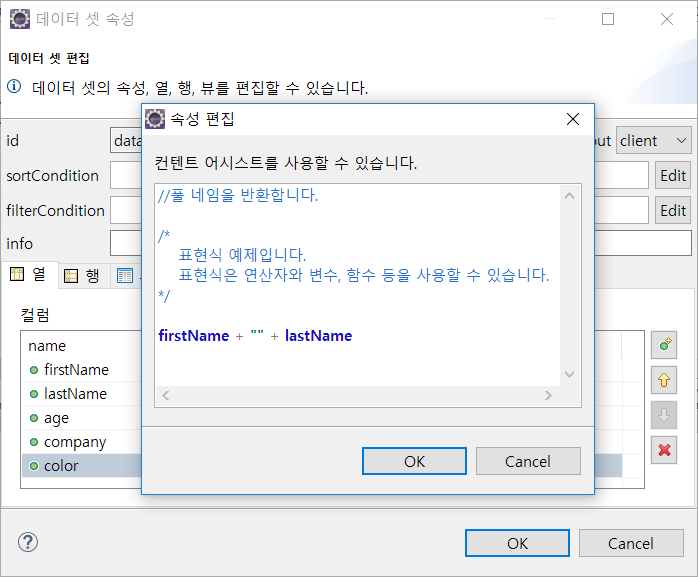
Grammar
Describes the basic syntax needed to write expressions.
operator precedence
| Priority | Operator | Description |
|---|---|---|
| 1 | () | Binding function calls or expressions |
| 2 | *, /, % | Multiply, Divide, Remainder |
| 3 | +, - | Addition or concatenation of strings, subtraction |
| 4 | <, <=, >, >=, *=, ^=, $= | Less Than, Less Than Or Equal To, Greater Than, Greater Than Or Equal To, Contains, Begins With, Ends With |
| 5 | ===, !==, ==, != | Completely Equal to, completely not equal to, equal to, not equal to |
| 6 | ?: | Ternary operator |
Arithmetic (binary) operators
| Operator | Description |
|---|---|
| + | Find the sum of two numbers concatenate strings. |
| - | Find the difference between two numbers. |
| * | Multiply two numbers. |
| / | Find the quotient of two numbers. |
| % | Find the remainder of dividing two numbers. |
Relational Operator
| Operator | Description |
|---|---|
| < | True if the right term is greater, false otherwise. |
| > | True if the left term is greater, false otherwise. |
| <= | True if the right term is greater than or equal to, false otherwise. |
| >= | True if the left term is greater than or equal to, false otherwise. |
| === | True if left and right terms are exactly equal, false otherwise. |
| !== | True if left and right terms are completely different, false otherwise. |
| == | True if the left term is equal to the right term, false otherwise. |
| != | True if the left term is different from the right term, false otherwise. |
| *= | True if the left term contains the contents of the right term, false otherwise. |
| ^= | True if the left term begins with the right term, false otherwise |
| $= | True if the left term ends with the right term, false otherwise. |
Logical Operator
| Operator | Description |
|---|---|
| && | True if both terms are true, false otherwise. |
| || | True if at least one of the two logical values is true, false otherwise. |
| ! | Performs a unary operation, false if the term being operated on is true, and true if false. |
| [Conditional Statement] ? [true] : [false] | When the result of [Conditional Statement]is true, perform the [true] term, or perform the [false] term. |
If else
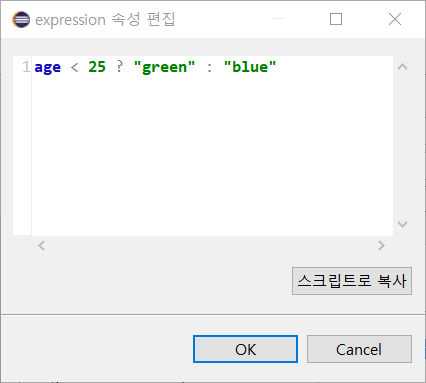
You can use if else syntax in expressions.
* Grammar
condition ? matching_value : not matching_value
* Usage Example
Switch
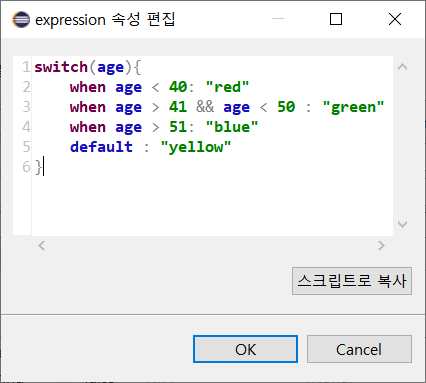
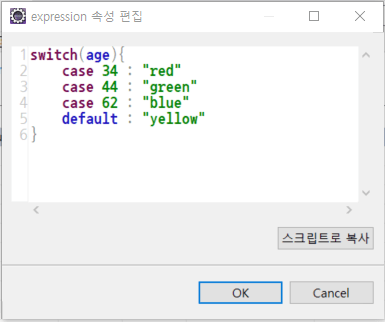
You can use switch statements in expressions.
* Grammar
switch[(variable)] { [case matching_value: return_value | when condition: return_value]... [default: return_value] }
* Usage Example
Constant
You can use constants provided by expressions. Each control provides a constant per expression-related property.
| Name | Description | Boundary |
|---|---|---|
| rowIndex |
Returns the current row index. @return current row index. |
Grid Row |
| localIndex |
Returns the index in the current rowgroup. @return my row index of the current rowgroup. |
Grid Row group |
| startRowIndex |
Returns the starting row index of the current rowgroup. @return the starting row index of the current rowgroup. row index |
Grid Row Group |
| endRowIndex |
Returns the last row index of the current rowgroup. @return end row index of current rowgroup. |
Grid Row Group |
| expanded |
Returns whether the current rowgroup is expanded or not. (Associated Property: Groups can be collapsed/expanded only when the Grid collapsible property is true.) @return whether or not the current rowgroup is expanded. |
Grid Row group |
Function
By default you can use all functions of the JavaScript Math object and the functions listed below.
DataSet Column Expression, DataRowContext
You can use the following functions in the expression property of a data set column and in the DataRowContext.
| Return type | Function name / Description |
|---|---|
|
<<columnName>> Column names of the Data Set |
|
| any |
getValue(columnName:string) Returns the data corresponding to the input columnName. @param columnName The name of the column from which you want to get the value. @return Following Data The return type is determined according to the header dataType.. If the column of the corresponding columnName exists, the corresponding value is returned If there is no value for the corresponding columnName, "" (blank) is returned Returns null if the corresponding columnName does not exist |
| any |
getOriginalValue(columnName: string)
Returns the original data corresponding to the input columnName.
If an invalid columnName is entered, null is returned.
Returns blank ("") when there is no data of the input columnName.
@param columnName of the column to get the value of columnName
@return Corresponding source data
|
| string |
getString(columnName: string) Returns data corresponding to the received columnName in String type. @param columnName of the column to get the value of columnName @return String type of the data |
| number |
getNumber(columnName: string) Returns the data corresponding to the received columnName in Number type. If the value is of string type and is forced to be number type, NaN is returned. @param columnName of the column to get the value of columnName @return Number type of the data |
| boolean |
getBoolean(columnName: string) Returns the data corresponding to the input columnName in Boolean type. @param columnName of the column to get the value of columnName @return Boolean type of the data |
| number |
getIndex() Returns the index of the current row. @return current row index |
| cpr.data.tabledata.RowState |
getState() Returns the state value of the current row. @return State value of the current row |
| string |
getStateString(isAbbreviation: boolean = true) Returns the status value of the current row in text format. @return Status value character of the current row |
DataSet SortCondition, FilterCondition
You can use the following functions in the sortCondition and filterCondition properties of a dataset.
| Return type | Function name / Description |
|---|---|
|
<<columnName>> Column names of the data set sortCondition, filterCondition are used as rules in expressions. column : When a,b,c, [sort condition] 1. a (asc) 2. a desc 3. b desc, a [filter condition] 1. a > 100 : Filter only rows where the value of column a is greater than 100 2. a >= 10 && b <= 20 : Filter only rows where the value of column a is greater than 10 and the value of column b is less than 20 |
|
| cpr.data.tabledata.RowState |
getState() Returns the state value of the current row. @return State value of the current row [filter condition] getState() == '2' : Filter only rows that are new |
| string |
getStateString(isAbbreviation: boolean = true) Returns the status value of the current row in text format. @return Status value character of the current row [filter condition] getState() == 'I' : Filter only rows that are new |
DataMap Column Expression, DataRowContext
You can use the following functions in the expression property of the data map column and in the DataMapContext.
| Return type | Function name / Description |
|---|---|
|
<<columnName>> Column names in Data Map |
|
| any |
getValue(columnName:string) Returns the data corresponding to the input columnName. @param columnName The name of the column from which you want to get the value. @return Following Data The return type is determined according to the header dataType.. If the column of the corresponding columnName exists, the corresponding value is returned If there is no value for the corresponding columnName, "" (blank) is returned Returns null if the corresponding columnName does not exist |
| any |
getOriginalValue(columnName: string)
	Returns the original data corresponding to the input columnName.
	If an invalid columnName is entered, null is returned.
	If there is no data of the input columnName, blank ("") is returned.
	@param columnName The columnName of the column to get the value for.
	@return the original data
|
| string |
getString(columnName: string) Returns the data corresponding to the input columnName in String type. @param columnName The columnName of the column to get the value for. @return the String type of the data |
| number |
getNumber(columnName: string) Returns the data corresponding to the input columnName in Number type. If the value is of string type and is forced to be number type, NaN is returned. @param columnName The columnName of the column to get the value for. @return Number type of data |
| boolean |
getBoolean(columnName: string) Returns the data corresponding to the input columnName in Boolean type. @param columnName The columnName of the column to get the value for. @return Boolean type of data |
| number |
getColumnCount() Returns the number of columns. @return number of columns |
Grid Grouping Row
You can use the following functions in the expression of the grouping row in the grid editor.
| Return format | Function name / Description |
|---|---|
|
<<columnName>> Data set column name of grid column |
|
| any |
getValue(rowIndex: number, columnName: string) Returns the value of a specific column. @param rowIndex The row index of the row to get the value for. @param columnName The columnName of the column to get the value for. @return that data. |
| number |
getRowCount() Returns the current number of rows. @return number of rows. |
| cpr.foundation.DecimalType |
getSum(columnName: string) Returns the sum of the column name data entered in the rowgroup. It should be used only when the value of the input column name is a Number type. @param columnName The name of the column for which the sum is to be calculated. @return The sum of the input column name values. |
| cpr.foundation.DecimalType |
getAvg(columnName: string) Returns the average of the column name data entered in the rowgroup. It should be used only when the value of the input column name is a Number type. @param columnName The name of the column for which the average is to be calculated. @return The average value of the input column name. |
| cpr.foundation.DecimalType |
getMax(columnName: string) Returns the maximum value of the column name data entered in the rowgroup. @param columnName The name of the column for which the maximum value is to be calculated. @return The maximum value of the input column name. |
| cpr.foundation.DecimalType |
getMin(columnName: string) Returns the minimum value of the column name data input in the rowgroup. @param columnName The name of the column for which the minimum value is to be obtained. @return The minimum value of the input column name. |
| cpr.foundation.DecimalType |
getConditionalMax(condition: string, columnName: string) Returns the maximum value of the input column name data among rows that meet the condition in the rowgroup. ※ Search for rows that meet the condition in the view-based row @param condition The filtering condition. @param columnName The name of the column for which the maximum value is to be calculated. The maximum value of the input column name data among rows that meet the @return condition. |
| cpr.foundation.DecimalType |
getConditionalMin(condition: string, columnName: string) Returns the minimum value of the input column name among rows that meet the condition in the rowgroup. ※ Search for rows that meet the condition in the view-based row @param condition The filtering condition. @param columnName The name of the column for which the minimum value is to be obtained. The minimum value of the input column name data among rows that meet the @return condition. |
| cpr.foundation.DecimalType |
getConditionalSum(condition: string, columnName: string) Returns the sum of the input column name data among rows that meet the condition in the rowgroup. It should be used only when the value of the corresponding column name is a Number type. ※ Search for rows that meet the condition in the view-based row @param condition The filtering condition. @param columnName The name of the column for which the sum is to be calculated. The sum of the input column name data among rows that meet the @return condition. |
| cpr.foundation.DecimalType |
getConditionalAvg(condition: string, columnName: string) Returns the average of the input column name data among rows that meet the condition in the rowgroup. It should be used only when the value of the corresponding column name is a Number type. ※ Searches for rows that meet the conditions in the view-based rows. @param condition The filtering condition. @param columnName The name of the column for which the average is to be calculated. The average of the input column name data among rows that meet the @return condition. |
| number |
getConditionalRowCount(condition: string) Returns the number of rows in the rowgroup that meet the condition. ※ Searches for rows that meet the conditions in the view-based rows. @param condition The filtering condition. @return The number of rows that match the condition. |
| number |
getConditionalRowCount(condition: string) Returns the number of rows in the rowgroup that meet the condition. ※ Searches for rows that meet the conditions in the view-based rows. @param condition The filtering condition. @return The number of rows that match the condition. |
Comment
You can use comments in expressions.
* Grammar
// Comment

/*
	Multi-line comments
*/
* Example