Convert to eXBuilder6 Project
By integrating a web project into an eXBuilder6 project, eXBuilder6 files (.clx) can be created and managed directly in the web project.
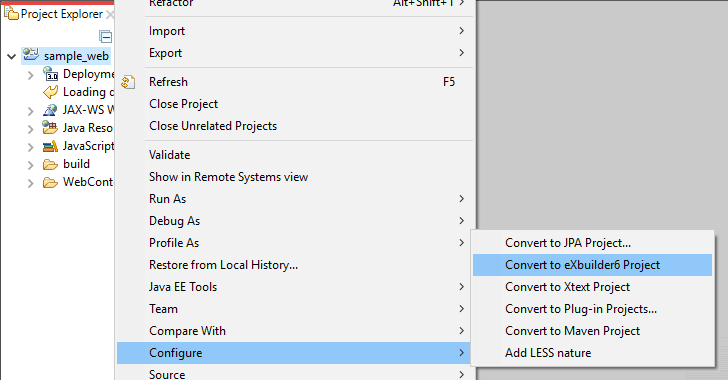
- After selecting the web project to which the eXBuilder6 project will be integrated, select Configure > Convert to eXBuilder6 Project from the pop-up menu.
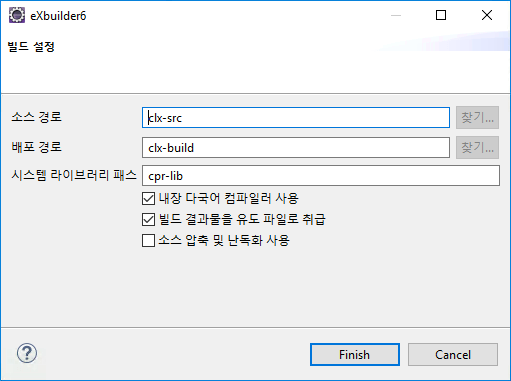
Convert to eXBuilder6 Project - After entering the build settings as when creating a new eXBuilder6 project, select the [Finish] button to integrate the eXBuilder6 project into the web project.
Convert to eXBuilder6 Project - For projects integrated with eXBuilder6 project, the source path and distribution path are added as shown below.
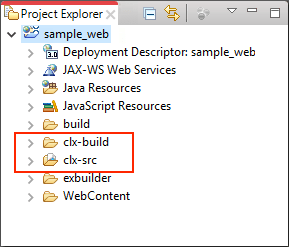
Web project integrated with eXBuilder6 project
Separation of WAS and web server deployment
When running web application server and web server in parallel, eXBuilder6's runtime components and user UI components can be operated separately as a web server.
- eXBuilder6 includes UI components created by users and runtime components necessary to display them in the browser. If the deployment assembly of the dynamic web project is set as shown in <Figure 1>, components of eXBuilder6 can be located on the web server as described below.
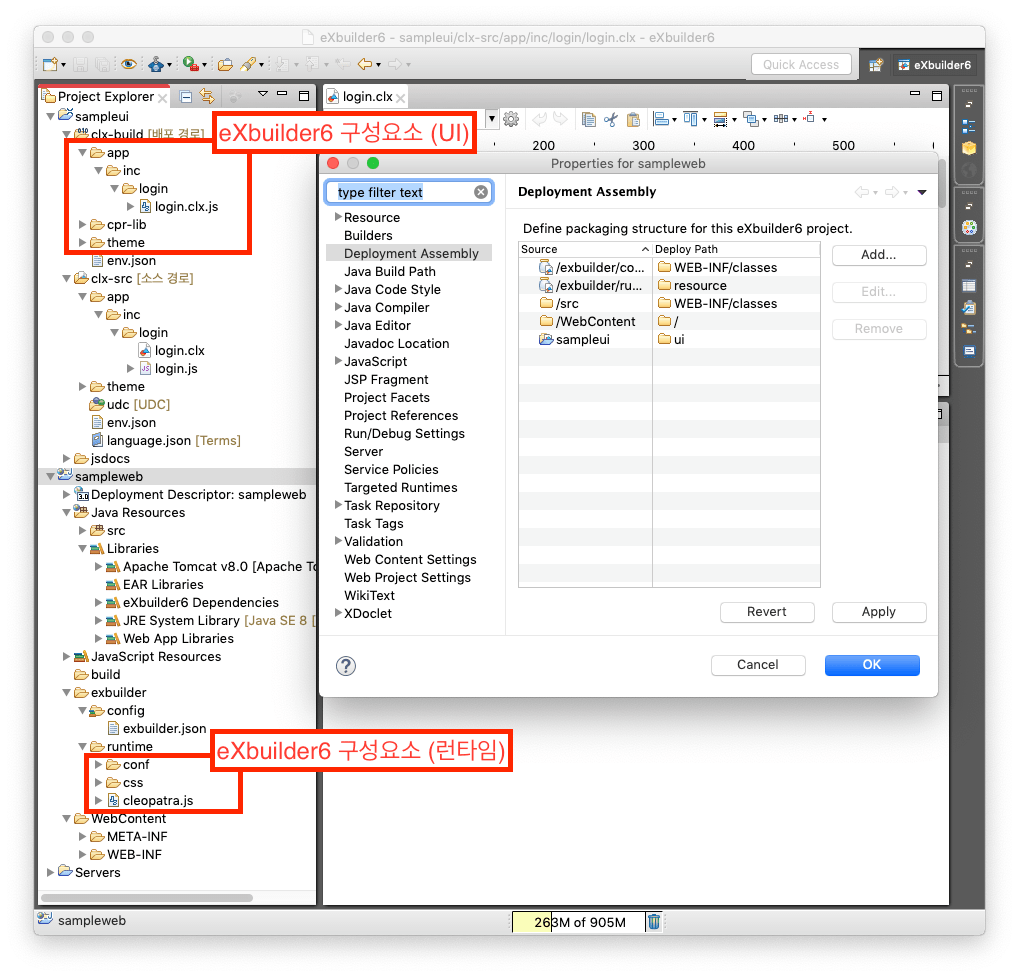
<Figure 1> Components of eXBuilder
When deploying to the ROOT path
- When a dynamic web project is deployed to the ROOT path, it is deployed to the web application server in the structure shown in <Figure 2> according to the deployment assembly.
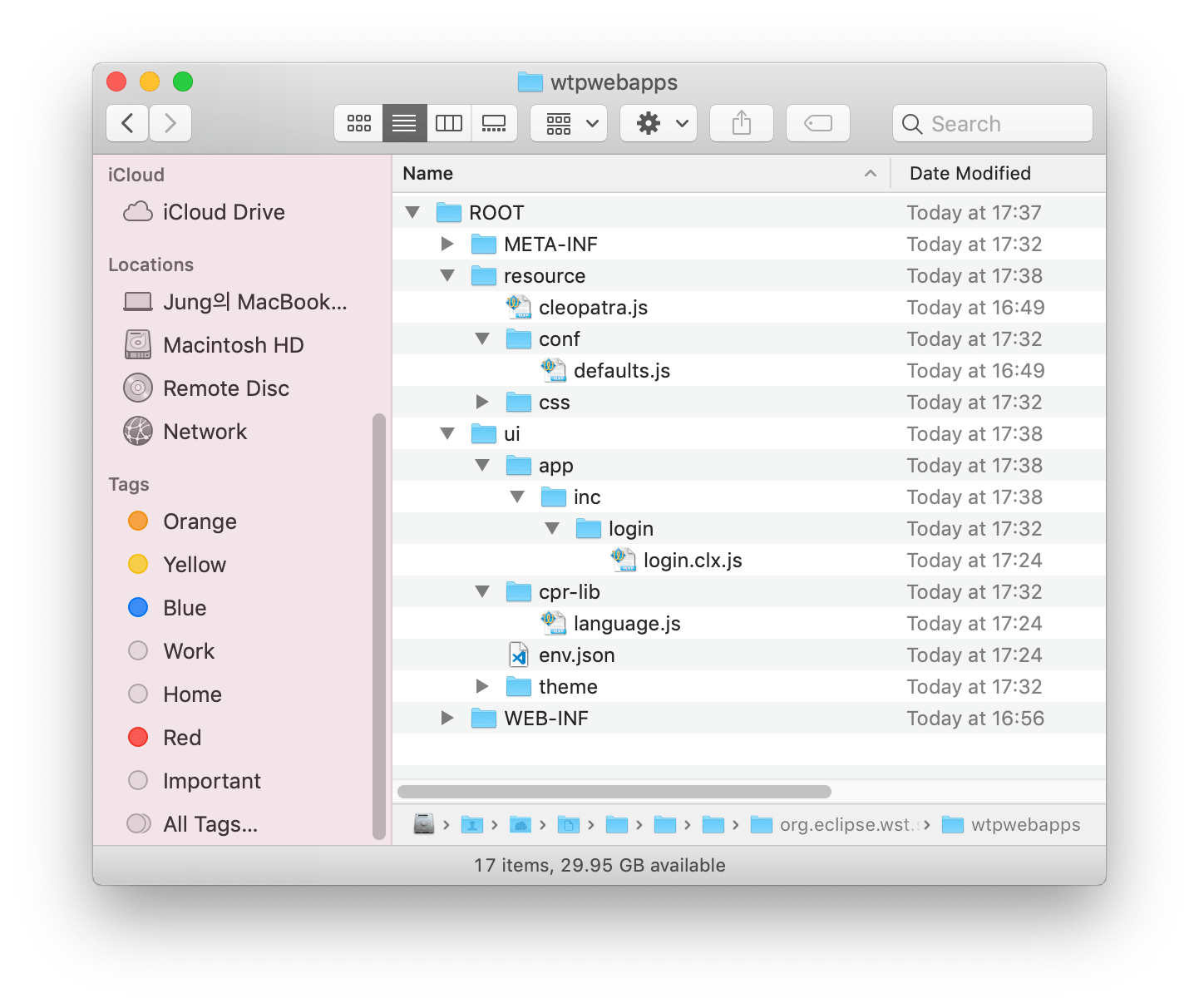
<Figure 2> Placement of deployed resources - As shown in <Figure 2>, components of eXBuilder6 can be deployed on the web server, excluding the env.json file used by the web application server among the deployed resources. The web project deployed in this way can be accessed at the address below.
http(s)://<<address>>/ui/app/inc/login/login.clx
When accessing the above address, the web application server creates a page in the form of <Figure 3>.

<Figure 3> Pages generated by the web application - The base address of the created page is "/ui/", which is the value described in the <base> tag, and resource files such as *.js and *.css referenced by the created page are based on the "/ui/" address. so you can see the content of the page. As above, when deploying the eXBuilder6 components of the project deployed in the ROOT path to the web server, they must be deployed to the root folder of the web server as shown in <Figure 4>. When deployed like this, the path of the "../resource/cleopatra.js" file described in <Figure 3> is "http(s)://<<address>>/resource/" based on the "/ui/" address. cleopatra.js", and when connecting to that address, you should be able to access the "cleopatra.js" file..
* The env.json file used by the web application server cannot be deployed to the web server.
* Please refer to <Figure 1> for the components of eXBuilder6..
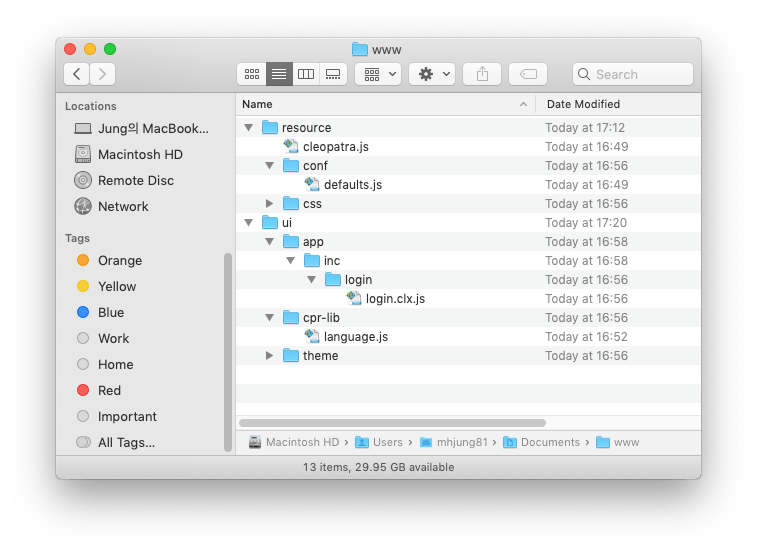
<Figure 4> Components of eXBuilder6 deployed on web server - If the components of eXBuilder6 are moved from the web application server to the web server, only the components needed to operate the web application remain in the web application server as shown in <Figure 5>.

<Figure 5> Essential components of web applications
When deploying to the sampleweb folder, which is the context path
- When a dynamic web project is deployed to the sampleweb path, it is deployed to the web application server in the structure shown in <Figure 6> according to the deployment assembly.
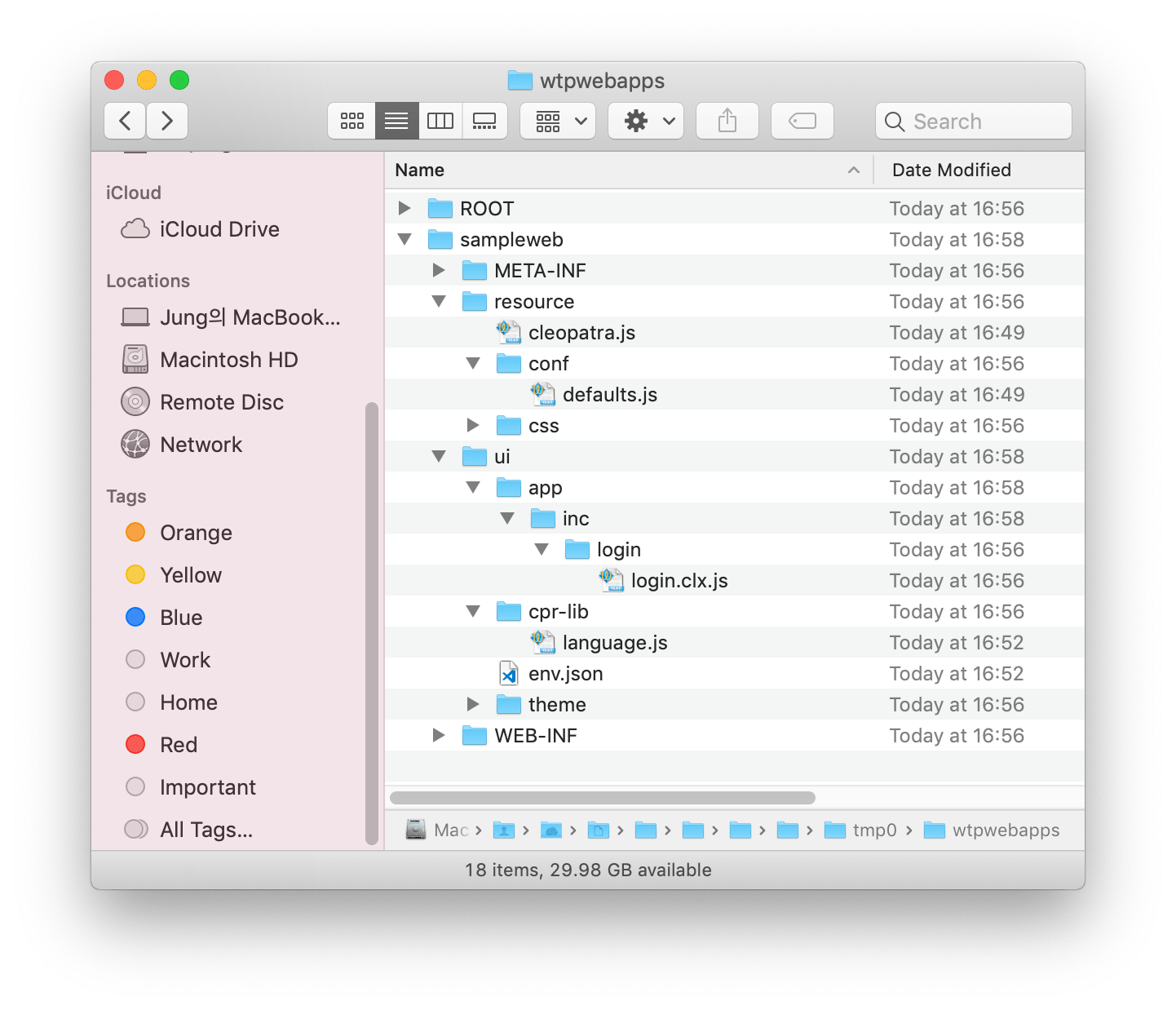
<Figure 6> Placement of deployed resources - As shown in <Figure 6>, components of eXBuilder6 can be deployed on the web server except for the env.json file used by the web application server among the deployed resources. The web project deployed in this way can be accessed at the address below..
http(s)://<<address>>/sampleweb/ui/app/inc/login/login.clx
When accessing the above address, the web application server creates a page in the format shown in <Figure 7>.
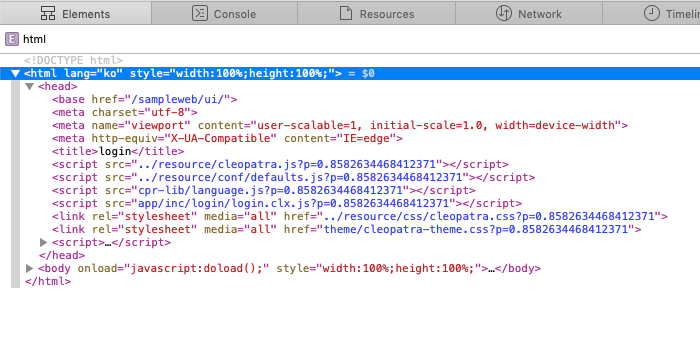
<Figure 7> Pages generated by the web application - The base address of the generated page is "/sampleweb/ui/", which is the value described in the <base> tag, and resource files such as *.js and *.css referenced by the generated page are "/sampleweb/ui/" " You must exist in the correct path based on the address to view the contents of the page.
When deploying eXBuilder6 components of the project deployed in the "sampleweb" path as above to the web server, they must be deployed in the sampleweb folder, a subfolder of the same name in the root folder of the web server, as shown in <Figure 8>.
When deployed like this, the path of the "../resource/cleopatra.js" file described in <Figure 7> is "http(s)://<<address>>/sampleweb" based on the "sampleweb/ui/" address. /resource/cleopatra.js" and when connecting to that address, you should be able to access the "cleopatra.js" file.
* The env.json file used by the web application server cannot be deployed to the web server.
* Please refer to <Figure 1> for the components of eXBuilder6.
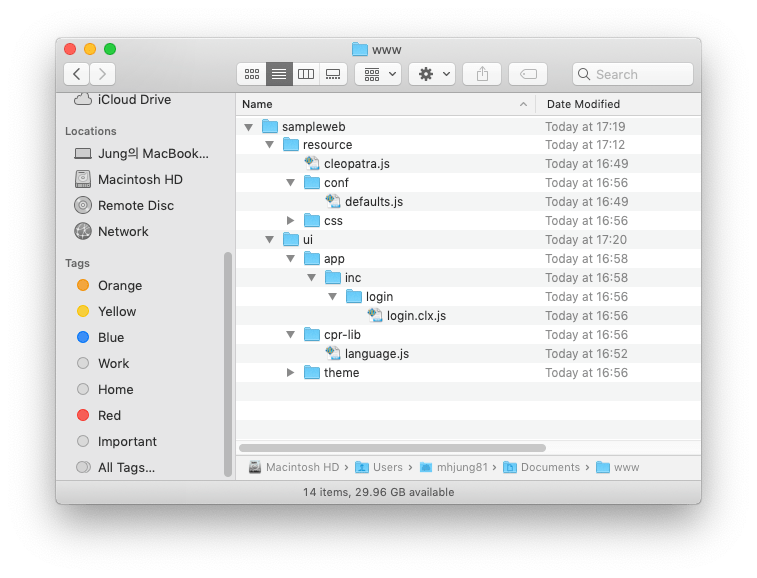
<Figure 8> Components of eXBuilder6 deployed on web server - When moving components of eXBuilder6 from the web application server to the web server, only the components required to operate the web application remain in the web application server as shown in <Figure 9>.

<Figure 9> Essential components of web applications